
Medium severityauthentication
Power BI Error:
AADSTS90072, External Account Not Found in Tenant: Fix
What does this error mean?
AADSTS90072 (PassThroughUserMfaError) means the signing-in account doesn't exist as a user or guest in the resource Entra ID tenant.
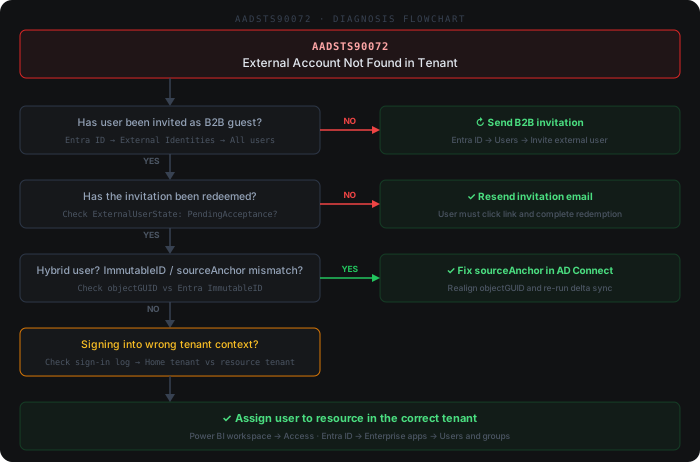
Quick diagnosis
Common causes
- 1The external user has never been invited as a B2B guest in the resource Microsoft Entra ID tenant, so no account exists to satisfy the tenant's MFA requirement
- 2ImmutableID (sourceAnchor) mismatch between on-premises Active Directory objectGUID and the Entra ID cloud object after an Azure AD Connect resync, domain migration, or hard-match attempt
- 3User signs in with a personal Microsoft account (MSA) but the app registration's signInAudience is restricted to organizational accounts in a single tenant
- 4Cross-tenant access settings on the resource tenant block inbound B2B collaboration from the user's home tenant, or a Conditional Access policy denies the guest before MFA can be evaluated
- 5Guest exists in the directory but has never registered an MFA method in the resource tenant, so the pass-through MFA check cannot complete
How to fix it
- 1In the Microsoft Entra admin center open Users > All users and search by UPN/email — if the account is missing, invite the user via 'New guest user' and have them redeem the invitation email before retrying the Power BI / Fabric sign-in
- 2If Azure AD Connect is in use, compare the cloud ImmutableID (Get-MgUser -UserId <upn> | Select-Object -ExpandProperty OnPremisesImmutableId) with the base64-encoded on-prem objectGUID — correct the sourceAnchor mismatch and trigger a delta sync with Start-ADSyncSyncCycle -PolicyType Delta
- 3Open the app registration manifest in Entra ID > App registrations and set signInAudience to AzureADMultipleOrgs (any work/school tenant) or AzureADandPersonalMicrosoftAccount if personal MSA logins must be supported by the Power BI embedded app or custom connector
- 4In Entra ID > External Identities > Cross-tenant access settings, verify the user's home tenant is allowed for inbound B2B collaboration and confirm no Conditional Access policy blocks guest MFA registration or sign-in from their location
- 5Have the guest register an MFA method in the resource tenant by visiting https://aka.ms/mfasetup while signed in to the resource tenant — without a registered method the pass-through MFA check defined by AADSTS90072 cannot succeed
Beyond the docs
Common practitioner solutions not covered in the official documentation.
- 1PowerShell: Check if the external user exists as B2B guest — Get-MgUser -Filter "mail eq 'external@otherdomain.com'" | Select-Object UserPrincipalName, UserType, ExternalUserState, ExternalUserStateChangeDateTime
- 2PowerShell: Send B2B invitation — New-MgInvitation -InvitedUserEmailAddress 'external@otherdomain.com' -InviteRedirectUrl 'https://myapps.microsoft.com' -SendInvitationMessage:$true
- 3ImmutableID mismatch (hybrid AD): Verify the sourceAnchor in on-premises AD matches the objectGUID synced to Entra — Get-ADUser -Identity <samAccountName> -Properties objectGUID | Select-Object @{n='ImmutableID';e={[System.Convert]::ToBase64String($_.objectGUID.ToByteArray())}}
- 4Tenant mismatch: In the Entra sign-in log, compare the 'Home tenant' and 'Resource tenant' fields — if they differ, the user must be invited as B2B guest in the resource tenant, not just in their home tenant
- 5After B2B invitation is redeemed, assign the user to the Power BI workspace or Enterprise App before they can access resources: Power BI admin portal → workspace → Access → add the guest user's email
Example log output
AADSTS90072: User account 'analyst@contoso.com' from identity provider 'https://sts.windows.net/9b4c8f1a-3d72-4e01-bc8a-0f1e2d3c4b5a/' does not exist in tenant 'fabrikam.onmicrosoft.com' and cannot access the application '00000009-0000-0000-c000-000000000000' (Microsoft Power BI). The account needs to be added as an external user in the tenant first.
[2026-05-09T06:12:43Z] DatasetRefresh ActivityId=a3f7e291-88cd-4b10-9f63-cc2d1a047e80 Status=Failed ErrorCode=AADSTS90072 Duration=1243ms