
Low severityauthentication
Power BI Error:
AADSTS700016, Application Not Found in Tenant: Causes & Fix
What does this error mean?
The client ID in the auth request does not exist as a service principal in the target Microsoft Entra ID (Azure AD) tenant.
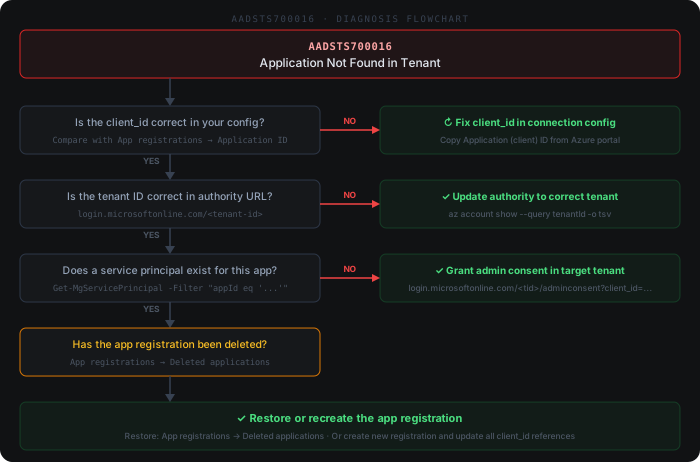
Quick diagnosis
Common causes
- 1Client ID in the Power BI / ADF / Fabric / Databricks connector config is mistyped or points to a deleted app registration
- 2Authentication request is sent to the wrong tenant — e.g. `/common` or a tenant GUID that differs from where the app is actually registered
- 3Multi-tenant app has never been consented to by an admin or user in the target tenant, so no service principal was provisioned
- 4Service principal in the target tenant was deleted or disabled in Entra ID → Enterprise applications
- 5Sign-in is attempted with a personal Microsoft account or B2B guest for an app that is not exposed to that account type
How to fix it
- 1Open Microsoft Entra ID → App registrations and copy the Application (client) ID, then compare it character-for-character with the client ID configured in your Power BI dataset, ADF linked service, Fabric connection or Databricks SP
- 2In the auth request / connection string, replace `/common` or any incorrect tenant GUID with the tenant ID where the app registration lives (Entra ID → Overview → Tenant ID)
- 3For a multi-tenant app used cross-tenant, have a Global Admin of the target tenant grant admin consent via `https://login.microsoftonline.com/{tenant-id}/adminconsent?client_id={client-id}` so a service principal is provisioned
- 4In Entra ID → Enterprise applications of the target tenant, confirm the service principal for this client ID exists and is enabled — restore it from soft-delete or recreate it via consent if missing
- 5If the app registration was recreated, update every consuming Power BI dataset, dataflow, ADF linked service and Databricks job with the new client ID and rotate the client secret
Beyond the docs
Common practitioner solutions not covered in the official documentation.
- 1PowerShell: Verify the app registration exists in the current tenant — Get-MgApplication -Filter "appId eq '<client-id>'" | Select-Object DisplayName, AppId, PublisherDomain
- 2PowerShell: Check if a service principal exists for the app (required for token issuance) — Get-MgServicePrincipal -Filter "appId eq '<client-id>'" | Select-Object DisplayName, AppId, AccountEnabled
- 3Multi-tenant admin consent: If the app is multi-tenant and not yet consented in the target tenant, run as a Global Admin: navigate to 'https://login.microsoftonline.com/<target-tenant-id>/adminconsent?client_id=<app-client-id>'
- 4Azure CLI: Confirm the correct tenant is active — az account show --query '{tenantId:tenantId, name:name}' — then run az ad app show --id <client-id> to verify the app registration is visible
- 5ADF / Fabric linked service: After correcting the client ID or tenant ID in the linked service configuration, always click 'Test connection' before saving — a successful test confirms the service principal is resolvable in the tenant
Example log output
ActivityId: a3f8c21d-04bb-4e17-b9fc-2d6e0a1c5f38 | Status: Failed | Error: AADSTS700016: Application with identifier '9b3e4f2a-17dc-4c88-bd01-5f6a3e8c02d1' was not found in the directory 'contoso.onmicrosoft.com'. This can happen if the application has not been installed by the administrator of the tenant or consented to by any user in the tenant.
RefreshType: Full | DatasetId: 8a1c3d9f-22ab-4f71-b604-3e5d7a0c9b12 | RefreshAttempt: 3/3 | FinalStatus: Disabled