
Critical severityauthentication
Power BI Error:
AADSTS53003, Blocked by Conditional Access: Causes & Fix
What does this error mean?
A Microsoft Entra ID (Azure AD) Conditional Access policy evaluated this sign-in and refused to issue a token.
Quick diagnosis
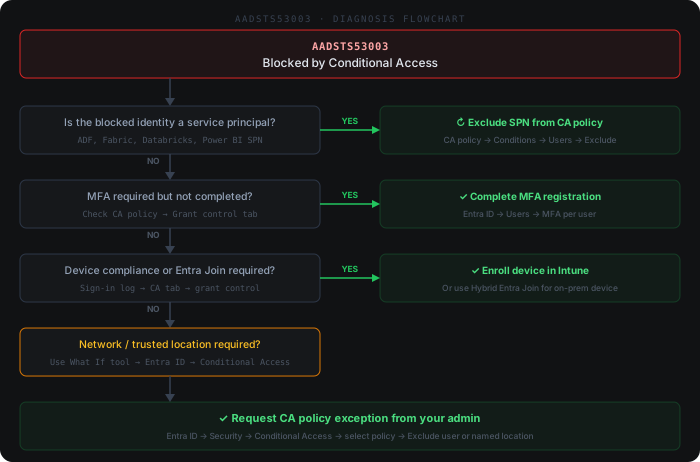
Common causes
- 1A Conditional Access policy requires a compliant or hybrid Entra-joined device, but the on-premises data gateway host, ADF self-hosted integration runtime VM, or Databricks driver node is not enrolled in Intune
- 2A policy enforces MFA on the targeted cloud app (Power BI Service, Azure Data Factory, Microsoft Fabric, Azure Databricks), but the refresh runs as a non-interactive flow (service principal, refresh token, scheduled dataset refresh) that cannot satisfy an MFA prompt
- 3A location-based policy blocks the public egress IP range of the gateway host, Fabric capacity, or Databricks workspace because that range is not in a trusted Named Location
- 4A user/group-targeted policy applies to the account or service principal running the refresh, and no exclusion exists for the workload-identity scenario
- 5Microsoft Entra ID Protection raised sign-in risk or user risk to a level that a risk-based Conditional Access policy blocks until the risk is remediated
How to fix it
- 1Open the Entra ID (Azure AD) portal → Sign-in logs (use 'Service principal sign-ins' for SPN-based refreshes), find the failed entry by Correlation ID, and on the Conditional Access tab read exactly which policy was 'Failure' and which grant/session control was not satisfied
- 2For non-interactive flows (scheduled Power BI refresh, ADF linked service, service principal, dataflow), exclude that service principal or its security group from the matching policy — or migrate it to a Conditional Access for workload identities policy that does not require interactive MFA
- 3For gateway, integration runtime, or Databricks hosts failing device or location controls, either add the public egress IP to a trusted Named Location or onboard the host to Intune compliance / Entra hybrid join so it satisfies the device control
- 4If a risk-based policy triggered the block, have an Entra ID Protection admin investigate and confirm-safe or reset password on the affected identity to clear the elevated risk
- 5Retry the Power BI dataset refresh or ADF/Fabric linked service connection test, then confirm in the sign-in logs that the new Correlation ID shows 'Success' under Conditional Access
Beyond the docs
Common practitioner solutions not covered in the official documentation.
- 1PowerShell: List all enabled Conditional Access policies targeting your app — Get-MgIdentityConditionalAccessPolicy | Where-Object {$_.State -eq 'enabled'} | Select-Object DisplayName, State | Sort-Object DisplayName
- 2Entra ID 'What If' tool: Simulate which CA policies apply to a specific user, app, IP, and device state before touching any policy — Entra ID → Security → Conditional Access → What If
- 3Sign-in log CA detail: In the Entra sign-in log entry, expand the 'Conditional Access' tab — it lists every policy evaluated, its result (success/failure/not applied), and the specific grant control not satisfied (MFA, compliant device, trusted location)
- 4PowerShell: Check if a user or service principal is already excluded from a CA policy — (Get-MgIdentityConditionalAccessPolicy -ConditionalAccessPolicyId '<policy-id>').Conditions.Users.ExcludeUsers
- 5Service principal exception: CA policies requiring MFA or device compliance cannot be satisfied by SPNs (ADF, Fabric, Databricks). Add the service principal object ID to the policy exclusion under Conditions → Users → Exclude → Select excluded service principals
Example log output
# MSAL / Azure SDK error response:
{
  "error": "access_denied",
  "error_description": "AADSTS53003: Access has been blocked by Conditional Access policies. The access policy does not allow token issuance."
}

# Entra ID sign-in log (Monitoring → Sign-in logs, error 53003):
Error code:     53003
Failure reason: Blocked by Conditional Access policy. Access policy does not allow token issuance.
CA policy name: Require compliant device for Power BI Service
Grant controls not satisfied: compliantDevice