
Low severityauthentication
Power BI Error:
AADSTS50105, User Not Assigned to a Role: Causes & Fix
What does this error mean?
AADSTS50105 means Entra ID blocks sign-in because the user has no direct role assignment on the enterprise application. Learn how to fix it.
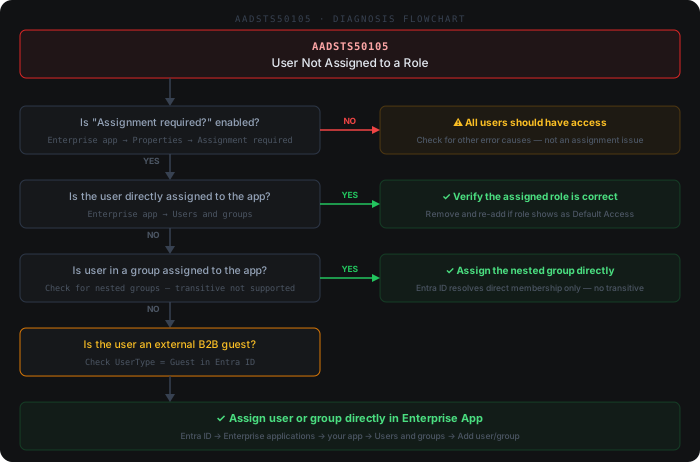
Quick diagnosis
Common causes
- 1The enterprise application has 'Assignment required?' set to Yes and the user has no direct assignment
- 2The user is only a member through a nested group — Entra ID does not resolve transitive membership for app assignment
- 3A previously assigned group was deleted or had dynamic membership rules that dropped the user
- 4Assignment was made on the app registration instead of the enterprise application (service principal) object
- 5SAML SSO is pointed at the wrong tenant or a stale app object, so the assignment lives on a different service principal
How to fix it
- 1In the Entra admin center, go to Enterprise applications → select the app → Users and groups and confirm the failing user is not listed directly
- 2Click + Add user/group, pick the user (or a directly-assigned security group, not nested) and select the correct app role
- 3If the app should be open to all tenant users, open Properties and set 'Assignment required?' to No — review security impact first
- 4Flatten nested groups: assign the immediate group containing the user, since Entra ID ignores transitive group membership for app assignment
- 5Have the user sign out completely and clear cached tokens (or use an InPrivate window) so a fresh token reflects the new assignment
Beyond the docs
Common practitioner solutions not covered in the official documentation.
- 1PowerShell: Check if 'Assignment required' is enabled for the enterprise app — (Get-MgServicePrincipal -Filter "displayName eq '<app-name>'").AppRoleAssignmentRequired
- 2PowerShell: List all users and groups currently assigned to the app — Get-MgServicePrincipalAppRoleAssignedTo -ServicePrincipalId '<sp-object-id>' | Select-Object PrincipalDisplayName, PrincipalType, CreatedDateTime
- 3PowerShell: Assign a user directly — New-MgUserAppRoleAssignment -UserId '<user-id>' -PrincipalId '<user-id>' -ResourceId '<sp-object-id>' -AppRoleId '00000000-0000-0000-0000-000000000000' (use the nil GUID for the default app role)
- 4Nested group issue: Entra ID does not resolve transitive group membership for app role assignments. If a user is in Group B which is a member of Group A, and only Group A is assigned — the user still gets AADSTS50105. Assign Group B directly, or add the user to Group A or to the app directly
- 5Guest users: External B2B guests require direct app role assignment or direct group membership in an assigned group. Group-based licensing (which enables group-based app assignment) requires Entra ID P1/P2 — without it, guests must be assigned directly via Enterprise apps → Users and groups
Example log output
Microsoft.PowerBI.DataMovement.Pipeline.GatewayCore: OAuth token acquisition failed for user j.doe@contoso.com — AADSTS50105: The signed-in user 'j.doe@contoso.com' is not assigned to a role for the application 'a8e7f2c1-3d4b-4a91-b8cc-2f05d6e1930a' (PowerBI-GatewayApp).
MSAL error: invalid_grant — interaction_required; correlation_id=3f8a1c22-bb47-4e09-9d61-07fa2e883c40
Scheduled refresh aborted after 0 rows processed; next retry in 30 min.