
Power BI Error:
AADSTS50012, Authentication Failed: Causes & Fix
What does this error mean?
AADSTS50012 means authentication failed in Azure AD (Microsoft Entra ID). This error is triggered when credential validation fails — typically due to an expired or invalid client secret, a signing certificate whose subject name isn't authorized, an untrusted certificate chain, a misconfigured tenant policy, or a client assertion with an invalid signature. It commonly appears during app registrations, service principal logins, Power BI dataset refreshes, and Azure Data Factory pipeline runs that rely on service principal or certificate-based authentication. The error can also surface in any OAuth2 flow where the application identity is verified against Azure AD. Because AADSTS50012 is intentionally generic, Azure AD does not expose the specific sub-reason in the public error message — you must inspect Entra ID sign-in logs (Entra ID → Monitoring → Sign-in logs, filter by error code 50012) to identify the exact credential or policy failure.
Quick diagnosis
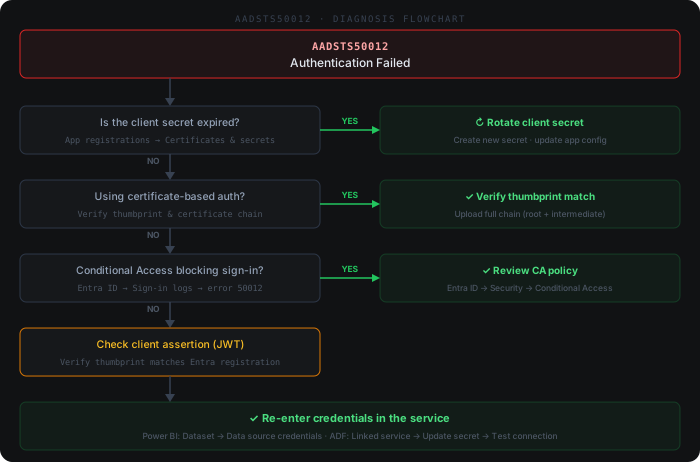
Common causes
- 1Client secret has expired or is invalid — Azure AD rejects the credential during token exchange
- 2Signing certificate subject name is not listed as an authorized subject in the app registration
- 3Certificate chain is invalid or incomplete — intermediate CA certificates are missing from the trust chain
- 4Tenant-level Conditional Access or authentication policy blocks the sign-in attempt
- 5Client assertion (JWT) contains an invalid or mismatched signature, often caused by using the wrong certificate thumbprint
How to fix it
- 1Step 1: Open the Azure portal → App registrations → select your app → Certificates & secrets. Verify your client secret has not expired. If expired, create a new secret and update your application config immediately.
- 2Step 2: If using certificate-based auth, confirm the certificate thumbprint in your app matches the one uploaded to Azure AD. Also verify the certificate chain is complete (root CA + intermediate) and that the subject name is listed under authorized subjects.
- 3Step 3: Check the Azure AD error lookup tool at login.microsoftonline.com/error?code=50012 for tenant-specific guidance. Review sign-in logs in Entra ID → Monitoring → Sign-in logs and filter by error code 50012 to identify the exact failure reason.
- 4Step 4: Review Conditional Access policies (Entra ID → Security → Conditional Access) to ensure no policy is blocking the service principal or user account attempting authentication.
- 5Step 5: For Power BI dataset refresh failures, navigate to the Power BI Admin portal → Dataset settings → Data source credentials and re-enter the OAuth2 or service principal credentials.
Beyond the docs
Common practitioner solutions not covered in the official documentation.
- 1PowerShell: List all app credential expiry dates — (Get-AzADApplication -DisplayName '<app-name>').PasswordCredentials | Select-Object DisplayName, EndDateTime | Sort-Object EndDateTime
- 2Azure CLI: Check service principal secret expiry — az ad sp credential list --id <app-id> --query '[].{Name:displayName,Expires:endDate}' -o table
- 3PowerShell (Microsoft Graph): Pull the last 20 sign-in failures for error 50012 — Get-MgAuditLogSignIn -Filter "status/errorCode eq 50012" -Top 20 | Select-Object CreatedDateTime, AppDisplayName, UserPrincipalName, @{n='Reason';e={$_.Status.FailureReason}}
- 4Sub-reason codes: The public error message is intentionally generic. In Entra ID sign-in logs, expand the Additional details column — the sub-reason distinguishes: expired secret (value 1), invalid certificate (value 2), Conditional Access policy block (value 7), and JWT signature mismatch (value 9).
- 5Power BI: After rotating a service principal secret, always navigate to the dataset's Data source credentials and re-authenticate — Power BI caches the old credential and does not pick up the new secret automatically.
Example log output
# Azure Data Factory pipeline run error (Activity output):
{
  "errorCode": "AADSTS50012",
  "message": "AADSTS50012: Authentication failed. The server returned an error code indicating that the authentication has failed.",
  "failureType": "UserError",
  "target": "Copy activity"
}

# Azure CLI (az account get-access-token):
ERROR: AADSTS50012: Authentication failed. Ensure the secret being sent is the client secret value, not the client secret ID.

# Entra ID sign-in log (Monitoring → Sign-in logs, filter error 50012):
Error code:     50012
Failure reason: Invalid client secret provided. Ensure the secret being sent in the request is
                the client secret value, not the client secret ID, for a secret added to
                app '<your-app-id>'.